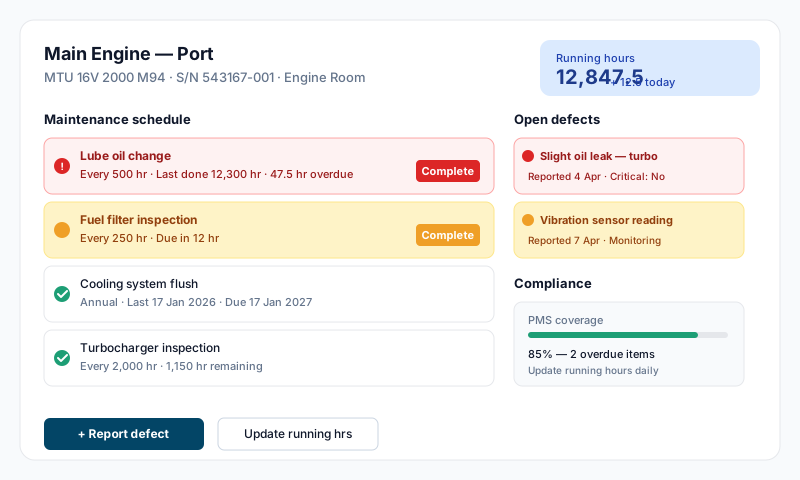
The Technical module is the engineering and maintenance hub for your vessel. It covers seven related areas, each with its own subsection in the sidebar:
- •Equipment — the master register of machinery and systems on board
- •Tasks — planned maintenance jobs (the PMS itself)
- •Inventory — consumable stock and low-stock alerts
- •Purchase Orders — procurement with line items, linked to accounting expenses
- •Surveys — class and flag survey scheduling, with findings and Conditions of Class
- •Maintenance Periods — planned windows (refit, dry dock) that group multiple tasks
- •Technical Checklists — recurring operational checks
Defects: report defects via Safety → SMS → Corrective Action Form (type: Defect or Defective Critical Equipment). If the defect needs scheduled remediation work, also create a Task here.
The Technical landing page is a dashboard with stat cards for Overdue Tasks, Low Stock Items, Pending POs, Overdue Surveys, and Conditions of Class — clicking any card takes you straight to the relevant filtered list.
Equipment Register
Each equipment item records:
- •Name, manufacturer, model number, serial number
- •Category (Propulsion, Power Generation, HVAC, etc.) and Location on vessel
- •Parent equipment — equipment hierarchy lets you nest sub-systems under their parent (e.g. fuel pump under main engine)
- •Installation date
- •Critical system flag — marks equipment that requires the special handling under ISM Code Chapter 10
- •Running hours — for hour-based maintenance schedules; tracked when Tracks Running Hours is enabled (defaults to on for engines, generators, thrusters, compressors, watermakers, etc.)
- •Attachments (manuals, drawings, certificates)
Add or edit equipment via Technical → Equipment → Add Equipment.
Planned Maintenance Tasks
Tasks are scheduled jobs against equipment (or independent jobs). Create a task via Technical → Tasks → Add Task, or directly from a piece of equipment or a survey finding.
Task fields:
- •Job title and description
- •Priority — Low, Medium, High, Critical
- •Category — Planned Maintenance, General Maintenance, Repair, Safety, Mandatory, Class, Owner's Request, Upgrade, Warranty, Refit, Critical, Inventory Inspection
- •Location and Equipment (optional link)
- •Assignee (responsible crew member)
- •Frequency for recurring tasks: Daily, Weekly, Fortnightly, Monthly, Bimonthly, Quarterly, Bi-annual, Yearly, 18 Months, 2 Yearly, 5 Yearly, 10 Yearly
- •Frequency end date (optional)
Mark a task complete by recording the completion date, notes, parts used, and any attachments.
Defect Reporting
When you find a problem:
- •Go to Safety → SMS → Corrective Action Form
- •Set the type to Defect or Defective Critical Equipment
- •Describe the issue, severity, and affected equipment
- •The corrective action is tracked through resolution and verification
If the defect requires planned remediation work, also create a Task under Technical → Tasks to schedule and track the work.
Inventory
Inventory tracks consumables, spares, and supplies. Each item has minimum/reorder quantities; the Technical dashboard surfaces items that are low stock or out of stock. Inventory inspections can be scheduled as recurring tasks (the Inventory Inspection category).
Purchase Orders
Create a Purchase Order for procurement of spares, services, or supplies. POs have line items, statuses (Draft / Pending / Approved / Ordered / Received / Closed / Cancelled), supplier details, and link directly to expenses in the Finance module on receipt.
Surveys
Surveys cover the standard class and flag survey types, plus the management company's own survey:
- •ASC — Annual Survey (Class)
- •ASF — Annual Survey (Flag)
- •CSA — Company Survey / Audit
- •DKS — Docking Survey
- •ENG — Engine Survey
- •FIA — Flag Interim Audit
- •FIN — Flag Initial Audit (one-time)
- •FIR — Flag Intermediate / Renewal
- •INT — Intermediate Survey
- •SIN — Statutory Internal Audit
- •SPS — Special Survey
- •STF — Statutory (Flag State)
- •TSS — Tail Shaft Survey
Each survey type has built-in scheduling rules — interval months, early window, and grace period — and the next due date is calculated automatically when a survey is closed. Surveys can record findings, and findings can be converted directly into tasks. Open class findings are tracked as Conditions of Class and counted on the Technical dashboard until cleared.
Maintenance Periods
Use Maintenance Periods to plan multi-task work blocks — a refit, dry dock, yard visit. Periods have statuses Planned / In Progress / Completed / Cancelled and group together the tasks that need to be done within them, with sequencing and a tasks table.
Technical Checklists
Technical Checklists are recurring operational checks (pre-departure, watch handovers, etc.) accessed from Technical → Technical Checklists.
Tips
- •Mark genuinely critical equipment with the Critical System flag — it surfaces in PSC reports and audits, and triggers the special ISM 10.3 handling
- •Update running hours regularly — they drive hour-based task due dates; stale hours mean stale schedules
- •Log defects via the SMS Corrective Action Form rather than fixing them informally — it builds the maintenance history PSC and class will look for, and lets you raise a Task to schedule the remediation
- •Use Maintenance Periods to plan refits — sequencing tasks within a period reduces yard delays and missed items
- •Never defer safety-critical maintenance without DPA approval — log the deferral as a corrective action with the rationale
- •PSC and class inspectors check PMS records — overdue tasks, open Conditions of Class, and missing surveys are the common deficiencies
- •Log every completion, even minor ones — the maintenance history is what proves the SMS works