When a new crew member joins a vessel, they must complete a three-stage familiarisation covering safety, vessel orientation, and role-specific training. This is a requirement under SOLAS, MLC 2006, and the ISPS Code.
How It's Structured
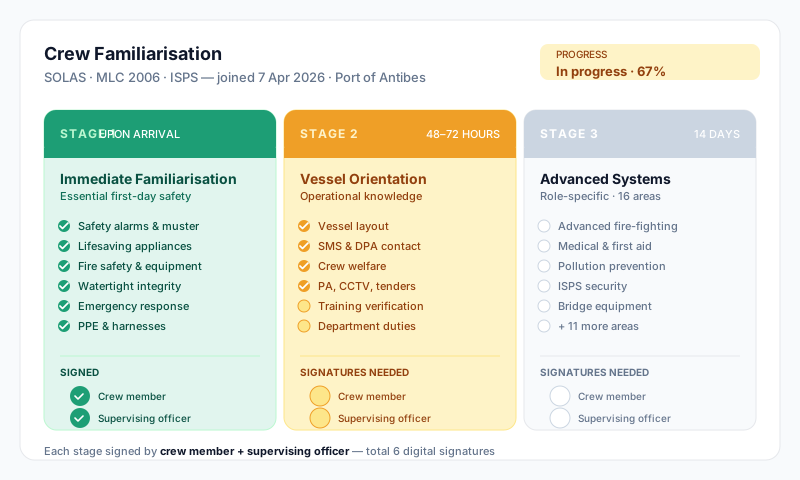
Familiarisation is split into three separate forms — one per stage. Each form is a standalone record:
- •Stage 1 — 24h (
crew_fam_24h) — first day on board - •Stage 2 — 72h (
crew_fam_72h) — within the first 72 hours - •Stage 3 — 14 Days (
crew_fam_14d) — within the first 14 days
Each form covers a different scope of items, has its own checklist completion, and is signed off independently before the next stage begins.
Where to Find It
The primary place to manage familiarisation is at vessel level:
- •From the dashboard, open the Crew module
- •In the crew sidebar, click Familiarisation Forms
You'll see three rows — one per stage type — each showing the most recent submissions and a + New button to start a fresh form. The list shows search, status filter (All / Open / Completed), and a "Recent Forms" panel of the most recent five.
Per-crew status is also visible on each crew member's profile under Employment → Familiarisation tab — this is a status view showing where each of their three stage forms is up to, with deep-links into the actual forms.
The Three Stages
Stage 1: First 24 Hours
Essential safety knowledge a crew member needs on their first day:
- •Safety Information & Alarms — muster stations, escape routes, alarm signals
- •Life-Saving Appliances — lifeboats, liferafts, lifejackets, immersion suits, EPIRBs
- •Fire Safety & Equipment — extinguishers, breathing apparatus, fire doors, detection systems
- •Doors, Openings & Watertight Integrity — operating fire, weather-tight, and watertight doors
- •Emergency Response — man overboard procedure, medical emergencies, first aid locations
- •Personal Safety Equipment — PPE, harnesses, lifelines
Stage 2: Within 72 Hours
Vessel orientation and operational knowledge:
- •Vessel Orientation & Layout — deck layout, compartments, escape routes, access routes
- •Safety Management & Documentation — SMS Manual location, DPA contact, reporting procedures
- •Crew Welfare & Living Arrangements — cabin assignment, mess rooms, recreation, laundry
- •Operational Equipment & Systems — PA system, CCTV, tender operations, mooring equipment
- •Training & Certifications — qualifications verified, drill schedule explained
- •Department-Specific Responsibilities — duties, watch-keeping, chain of command
Stage 3: Within 14 Days
Advanced systems and role-specific training across 16 areas:
- •Advanced Fire-Fighting Systems
- •Life-Saving Equipment (advanced)
- •Medical and First Aid
- •Pollution Prevention and Response
- •Security (ISPS Code requirements)
- •Navigation and Bridge Equipment
- •Engineering Systems
- •Enclosed Spaces and Permit to Work
- •Cargo Operations
- •Tender and Water Sports
- •Guest Services and Safety
- •Environmental Awareness
- •Company Procedures
- •Equipment-Specific Familiarisation
- •Special Areas (helideck, machinery spaces, etc.)
- •Dangerous Goods
Creating and Completing a Form
- •Open Crew → Familiarisation Forms
- •Click + New on the relevant stage row (24h, 72h, or 14 Days)
- •Pick the crew member from the form
- •Fill in the header information:
- •Port Location — where the crew member is joining the vessel
- •Previous Service — whether they've served on this vessel before
- •Date / Time Joining — when they joined
- •Expected Departure — when their contract is expected to end
- •Work through the checklist with a supervising officer, ticking each item once familiarisation is genuinely covered
- •At the bottom of the form, capture the two signatures:
- •Crew Member — signing to confirm they have been familiarised
- •Supervising Officer — the officer's signature confirming they supervised the familiarisation
- •Save — when both signatures are present, the form flips from Open to Completed and the server stamps who recorded it and when
Repeat for each of the three stages on its own form.
Signatures Required
| Stage | Signatures needed |
|---|---|
| Stage 1 (24h) | Crew Member + Supervising Officer |
| Stage 2 (72h) | Crew Member + Supervising Officer |
| Stage 3 (14 Days) | Crew Member + Supervising Officer |
Total: 6 digital signatures to complete the full familiarisation. There is no separate captain final sign-off — the supervising officer's signature on each stage is the final approval for that stage.
Status
- •Open — form created, checklist in progress, signatures not yet complete
- •Completed — both signatures captured; the form is locked
Permissions
- •Crew members can create and edit their own familiarisation forms (own-profile bypass)
- •Other users need HR vessel access (account owner / Account Admin / Superadmin, or the Can Access Employment permission) to create or edit forms on behalf of crew
Tips
- •Stage 1 must be completed on the day of arrival — don't delay
- •Familiarisation forms are checked during PSC inspections — make sure all items are genuinely covered, not just ticked
- •New crew must also participate in an emergency drill within 24 hours of joining (recorded separately under Safety → Drills)
- •The vessel-wide Familiarisation Forms view shows red "N missing" chips when crew are missing a required stage form — click the chip to drill into who is missing what
- •Submissions are linked to the crew member's active employment contract automatically, so per-crew status panels can roll up across past and current contracts