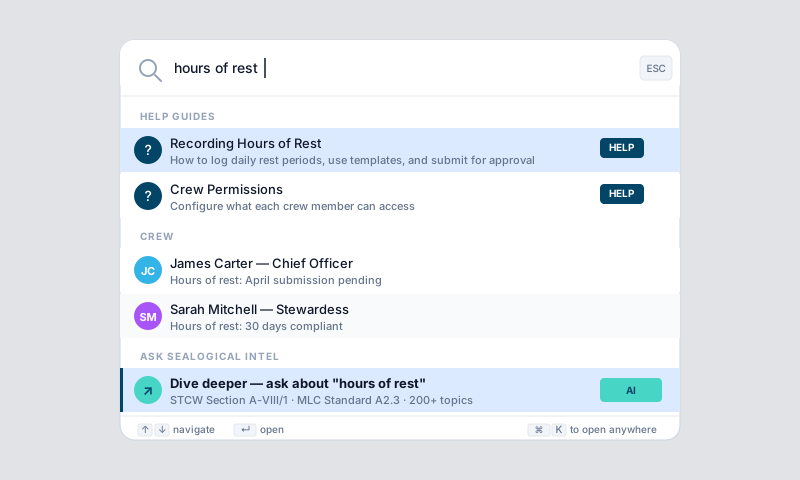
Sealogical Intel is the platform's universal search and AI assistant. Press Cmd+K (or Ctrl+K on Windows) from anywhere to open it. The dialog has two modes:
- •Search — find any record across your vessel, plus navigation shortcuts and help articles
- •Chat — ask the AI maritime assistant about regulations, compliance, or your vessel's data
Search
Start typing and the dialog returns matching records grouped by module — Crew, Safety, Certificates, Technical, Vessel, Charter, Finance, and Help. Each result shows a relevant status badge (e.g. Active, Expired, Overdue, Pending, Faulty, Low Stock, On Leave) and links straight to the underlying page.
Indexed record types include:
- •Crew — crew members, crew documents, leave requests
- •Safety — submitted forms, form templates, safety documents, drills
- •Certificates — certificate types and uploaded certificate documents
- •Technical — equipment, tasks, inventory, purchase orders, surveys
- •Charter — charters
- •Finance — invoices
- •SMS Sections — every section across the 12 ISM chapters
- •Help articles — every guide in this Help centre
- •Navigation — shortcuts to every module and subsection
Results are permission-filtered — you only see records you have access to.
Chat (AI Maritime Assistant)
Switch to chat mode in two ways:
- •After a search, click "Dive deeper: '{your query}'" at the bottom of the results
- •If no records match, the dialog offers "Ask about '{your query}'" as an empty state
In chat mode, the assistant draws on:
- •Your vessel's records — to answer questions like "show me expiring certificates", "what drills are overdue", or "what tasks are due this week"
- •A curated maritime knowledge base of around 195 chunks across 50+ categories: ISM, MLC, STCW, MARPOL, COLREGS, MCA, PSC, registration, classification, fiscal/VAT, flag state, employment law, hours of rest, crew tax, crew visas, watchkeeping, navigation, stability, fire safety, electrical safety, food safety, helicopter ops, salvage, P&I club, insurance, drug & alcohol, cyber security, and more
The assistant cites specific regulation references where it can (e.g. "MLC Standard A2.3", "COLREGS Rule 5", "ISM Code 5.2") and supports follow-up questions in the same session.
Search Index Refresh
The vessel search index is rebuilt automatically every night at 04:00 UTC. Records you add today will be searchable within 24 hours. Account administrators can trigger an immediate refresh from the search dialog when needed.
Tips
- •Open the dialog from any page — the keyboard shortcut works everywhere
- •Search by crew name, certificate type, equipment name, document number, or any keyword that appears in a record's title or subtitle
- •Use the AI for questions that span regulations and your vessel's data — for example "are we compliant with MLC hours of rest this month?"
- •The AI is a guide, not a legal advisor — always verify critical compliance and regulatory information against the official source documents
- •Newly created records take up to 24 hours to appear in search until the next index rebuild
- •Help articles are searchable too — type any topic to find the relevant guide
- •Intel is one of several AI features — see the Using the AI Tools guide for document scanning, bulk import, and the module-level AI searches