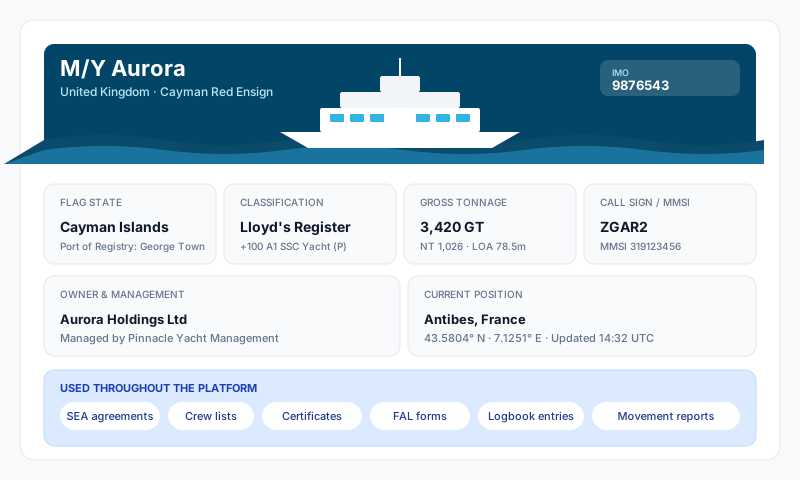
The Vessel module is the home for everything tied to the vessel record itself — its identity, specifications, who manages it, who insures it, who flags it, and a record of its movements. The sidebar groups eight subsections into three areas:
Operations
- •Movement Reports — formal Departure / Noon / Arrival reports for every voyage
- •Movement Checklists — recurring operational checklists tied to a voyage stage
Vessel Record
- •Vessel Details — physical specifications, identifiers, designers, capacities
- •Communications — call sign, MMSI, satcom, telephones, email addresses
Administration
- •Management Company — the management company record (name, address, contacts)
- •Flag and Class — flag state and class society details
- •Insurance — vessel insurance policies (P&I, H&M, etc.)
- •Billing — account billing details
The module opens by default to Movement Reports.
Vessel Details
The Vessel Details subsection is split into cards covering different aspects of the vessel:
Identity
Name (required), Vessel Type (Motor Yacht / Sailing Yacht / Catamaran / Explorer), Registration (Pleasure / Commercial / Charter), Launch Year, Refit Year, Hull ID, Builder, Exterior Designer, Interior Designer, Naval Architect, Call Sign, MMSI, IMO Number, Yacht's Official Number, Charter Company
Dimensions and Tonnage
LOA (m), Beam (m), Draft (m), Gross Tonnage, Net Tonnage, Displacement (t)
Materials
Hull Material (Steel / Aluminium / Fiberglass / Carbon Fiber / Wood), Superstructure Material (Steel / Aluminium / Fiberglass / Carbon Fiber)
Capacities
Fuel Capacity (L), Water Capacity (L), Guest Cabins, Guest Berths, Crew Cabins, Crew Berths
Engines and Performance
Main Engine Make / Model / Power (kW), Number of Engines, Cruising Speed (kts), Max Speed (kts), Range (nm), Fuel Consumption (L/hr), Horsepower
Generators and Electrical
Generator Make / Model / Power (kW), Electrical System, Fuel Type (Diesel / MGO / HFO / LNG / Hybrid / Electric)
Vessel Logo
Upload a vessel logo image (JPEG, PNG, GIF, WebP, HEIC) used on generated PDF reports.
These details flow through to FAL forms, certificate records, vessel reports, the Schengen and movement reports, and the SEA agreement template — keep them current.
Movement Reports
Movement Reports are formal voyage records. Three report types make up a voyage:
- •Departure Report — voyage info, vessel status, fuel, weather, safety compliance, header
- •Noon Report — position and navigation, voyage progress, engine and propulsion data, fuel at noon, weather at noon, destination updates
- •Arrival Report — header, arrival info, weather, regulatory notifications, POB on arrival, fuel on arrival, voyage summary, voyage fuel summary, incidents and defects
Reports are grouped into voyages by voyage number, with summaries showing departure port, arrival port, dates, distance, and fuel consumed. Use + New Report to start a Departure, Noon, or Arrival report; the system links them into the same voyage automatically.
A filed report shows a blue completed badge. The Master then signs it to confirm it is a true record of the voyage — a signed report turns green (signed), so the voyage list shows at a glance which reports still need the Master's signature.
Movement Checklists
Operational checklists run alongside movement reports — for example pre-departure, anchor watch, or in-port routines. From this subsection, pick a checklist template, attach it to a voyage stage, and complete the items.
Communications
The Communications subsection records the vessel's contact details: satellite phone numbers, email addresses, INMARSAT IDs, MMSI, call sign, and so on. These are referenced by other modules where vessel contact details are needed (e.g. emergency contact lists in the SMS forms).
Management Company
A single subsection for the management company that operates the vessel — name, address, primary contacts, and any reference numbers. Used on official documents and reports.
Flag and Class
Records the flag state and classification society the vessel is registered under, with the relevant reference numbers. Statutory and class certificates in the Certificates module link back to these records.
Insurance
Multiple insurance policies can be tracked here — typically P&I, Hull & Machinery, and any additional cover — with insurer, broker, policy number, effective date, expiry date, and amount. Insurance certificates uploaded under the Certificates module can sync directly into the policy record.
Billing
The Billing subsection holds the account-level billing details for Sealogical itself — billing contact, address, and payment information.
Tips
- •Keep Vessel Details up to date — they're used throughout the platform on FAL forms, crew lists, certificate records, voyage reports, and the SEA agreement template
- •Submit Departure, Noon, and Arrival reports promptly — they form the official voyage record and feed the vessel's fuel and emissions reports
- •Insurance policies and the Insurance certificate type can be kept in sync — upload the policy as a certificate and tick "Sync to module" after AI extraction
- •Flag and Class details need to match what's printed on your statutory certificates exactly — mismatches confuse PSC and class auditors